One click water tracking with water goal

Suggestion for water tracking directly on MFP dashboard.
Create a Water Dashboard segment. Eg., like the one for Weekly Habits or for Exercise.
The segment would have 4 components:
Heading —> Water
Plus sign —> To add 1 water count. Each time the plus sign is clicked, no other window popups up, it just records 1 glass of water.
Icon or Icons —> To display the number of glasses consumed. See below for display options.
Goal: —> The user sets their daily water intake goal the same way as other goals are set. The goal is displayed at the bottom of segment.
3 Consumed water options:
Mock up A) The equivalent of their goal in cups, 8 fluid ounces or 250ml is displayed as empty glasses. The user clicks the + sign in the top right-hand corner of the segment to record 1 glass, which is then ‘filled’ with blue shading.
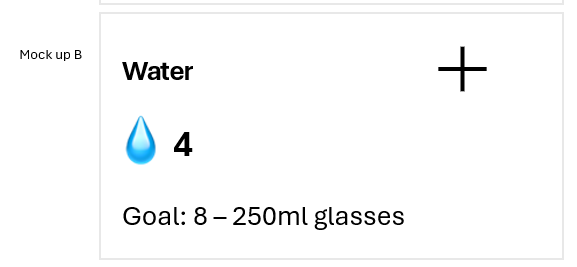
Mockup B) A filled glass icon with a simple number displayed as the count of glasses recorded. (This is similar to the Steps Dashboard segment). Each time the plus sign is clicked, the number in the segment increases by 1.
Mock up C) Similar to A) except the empty glasses are marked with a checkmark.

Replies
-
User story: It should not take longer to record a glass of water than it took to drink it.
One click for water tracking makes it fast and simple.
Alternative icon for mock up B) using the same water drop as is used in the current MFP Weekly Habits for water tracking.
 1
1 -
I've read some of the other suggestions on water tracking and the desire for a timestamp. I agree that a water timestamp would be nice. I've thought about how this might work on the dashboard and ultimately, I think it would be too busy on the dashboard.
1

Categories
- All Categories
- 1.4M Health, Wellness and Goals
- 398.2K Introduce Yourself
- 44.7K Getting Started
- 261K Health and Weight Loss
- 176.4K Food and Nutrition
- 47.7K Recipes
- 233K Fitness and Exercise
- 463 Sleep, Mindfulness and Overall Wellness
- 6.5K Goal: Maintaining Weight
- 8.7K Goal: Gaining Weight and Body Building
- 153.5K Motivation and Support
- 8.4K Challenges
- 1.4K Debate Club
- 96.5K Chit-Chat
- 2.6K Fun and Games
- 4.8K MyFitnessPal Information
- 13 News and Announcements
- 21 MyFitnessPal Academy
- 1.6K Feature Suggestions and Ideas
- 3.2K MyFitnessPal Tech Support Questions